treereduce
treereduce is a fast, parallel, syntax-aware test case reducer based on
tree-sitter grammars. In other words, treereduce helps you shrink structured
data (especially source code) while maintaining some property of interest, for
example, that the program causes a compiler crash or outputs a certain message.
See the overview for more information, or get started right away with installation and usage.
Source available on Github.
Installation
From a Release
Statically-linked Linux binaries are available on the releases page.
From crates.io
You can build a released version from crates.io. You’ll need the
Rust compiler and the Cargo build tool. rustup makes it very
easy to obtain these. Then, to install the reducer for the language <LANG>,
run:
cargo install treereduce-<LANG>
This will install binaries in ~/.cargo/bin by default.
From Source
You can also build from source.
Usage
treereduce needs a testcase and an interestingness test. The test
case can be provided on stdin or via a file with --source (-s). The
interestingness test is an executable (or script) that exits with 0 if the test
is still interesting, or with any other code otherwise. The interestingness
test is provided on the treereduce command line after a --. It can either
receive the partially-reduced program on stdin, or via a file provided as
command-line argument. In the latter case, the special symbol @@ in the
command line tells treereduce how to provide the file path. For example,
here’s how to reduce a C program while making sure it still compiles with
clang:
treereduce-c -s program.c -- clang -o /dev/null @@.c
By default, the resulting file is saved to treereduce.out; this can be
changed with --output. See --help for more information.
Getting results faster
Try --fast. If that’s not fast enough, read on.
The following tips are in order of descending utility, the last few will technically make things a bit faster but the gains will be very minor.
- Try
--passes 1. - Set
--jobsto something close to your number of CPU cores.
- Pass the input to your program on stdin instead of via a file. If your program must take a file, put it on a tmpfs.
- Avoid using a script to wrap your interestingness test if you can, using
--interesting-exit-codeinstead. - For really slow tests, use
--no-verifyonce you’ve set up your interestingness test. - If the input file is generated, pass it to
treereduceon stdin. - If you don’t need the output to be a file, pass
--output -to get output on stdout.
Getting smaller tests
Try --slow. If that’s not small enough, read on.
- Use
--stable. If that’s too slow, increase--passes. - Set
--min-reduction 1. - Run Halfempty or another test-case reducer on the output.
Contributing
Thank you for your interest in treereduce! We welcome and appreciate all kinds of
contributions. Please feel free to file and issue or open a pull request.
You may want to take a look at:
-
The developer guide, specifically
If you have questions, please ask them on the discussions page!
Overview
Features
-
Fast:
treereduceuses a novel algorithm for parallelized reduction of tree-shaped data, based on ideas from recent research. It has been benchmarked against similar tools. -
Effective:
treereduceproduces small programs. -
Robust:
treereduceis based on tree-sitter grammars, which are robust to parse errors. This means you can reduce syntactically invalid inputs, and each grammar doesn’t need to be 100% perfect to work for all programs. -
Easy to set up:
treereducereducers are distributed as static binaries. -
Multi-language:
treereducecurrently supports the following languages:- C
- Java
- JavaScript
- Lua
- Rust
- Soufflé
- Swift
Comparison to Other Tools
Test-case reduction tools form a spectrum: tools that are completely agnostic
to the input format (e.g., Halfempty) are applicable in more situations, but
will likely perform worse than highly-specialized tools (e.g., C-reduce).
treereduce is somewhere in the middle: it is aware of the syntax of inputs,
and works on a variety of different languages.
Perses and Picireny are also syntax-aware; they use ANTLR rather than tree-
sitter grammars (making them unable to mutate malformed inputs). The goal of
treereduce is to be faster and/or easier to use than these tools.
The following table lists several test-case reduction tools:
| Tool | Input | Grammar | Parallel |
|---|---|---|---|
| comby-reducer | C-like | n/a | |
| C-Reduce | C | n/a | ✅ |
| GTR | not sure | not sure | ? |
| Halfempty | any | n/a | ✅ |
| Perses | [note] | ANTLR | ? |
| Picireny | any | ANTLR | ✅ |
treereduce | [note] | tree-sitter | ✅ |
[note]: Perses supports the following languages:
- C
- Rust
- Java 8
- Go
- System Verilog
treereduce currently supports the languages listed above.
Benchmarks
The following benchmarks compare Halfempty, Picireny, and treereduce on C
and C++ source code; see the overview for general a general
comparison of these tools.
As discussed in the overview, one would generally expect that, as the more
specialized tools, Picireny and treereduce will produce the smallest
(highest-quality) outputs, with Halfempty last.
Note: I am not an expert on many of the tools included in these benchmarks. I have tried my best to understand them, but there may be more effective ways of using them that would lead to better results.
Basic program
This benchmark involves running each tool with its default settings on a small C program. The “interestingness test” is whether the program still compiles.
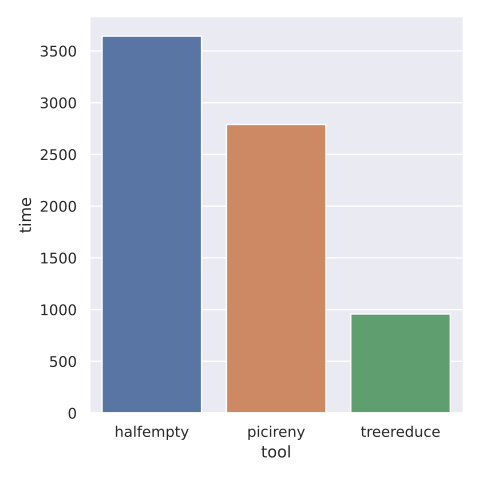
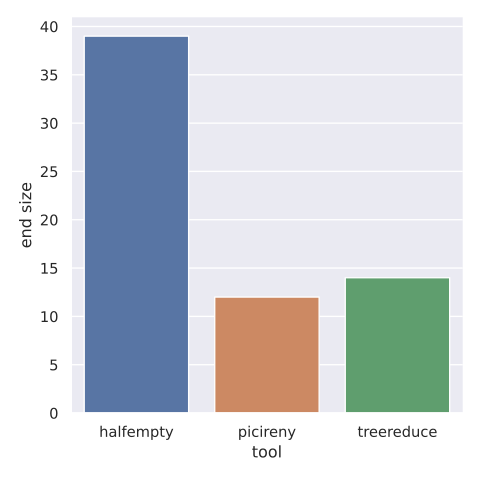
The following plots shows the time taken by the different tools (in
milliseconds), and the resulting program size (lower is better). They show
that treereduce is fastest, though Picireny produces better output (by a
few bytes).
Basic program with -Werror
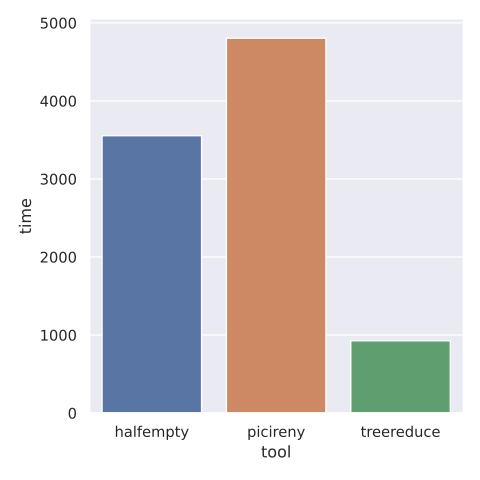
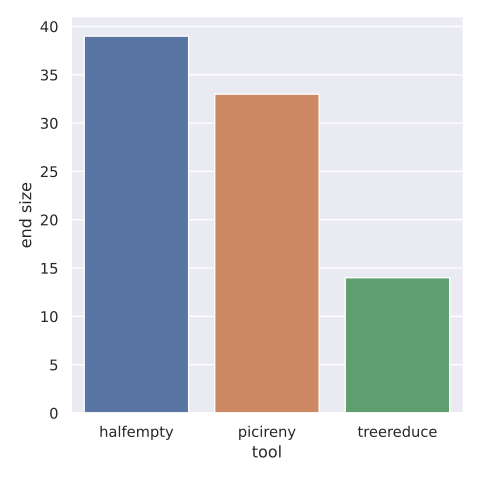
This benchmark is the same as the last, except that the “interestingness test”
is whether the program still compiles with -Werror.
The plots show that treereduce is fastest and produces the best output.
Pre-processed “Hello, world!”
This benchmark involves running each tool with its default settings on a “hello world” program, after running the C pre-processor. The “interestingness test” is whether the program still compiles.
With a timeout of 300s, only treereduce was able to complete this task. It
reduced the file size from 35123 to 4769 bytes.
Best case
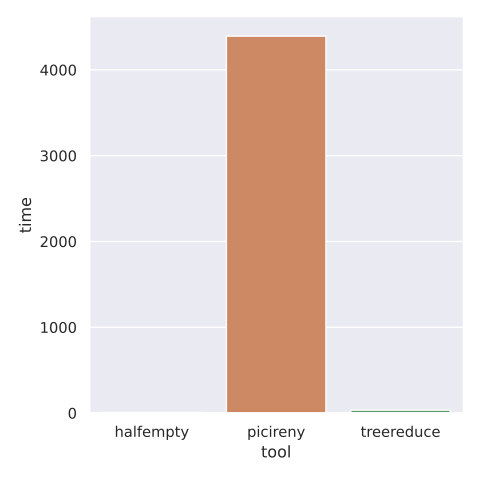
This benchmark involves running each tool with its default settings on a
small C program. The “interestingness test” always succeeds. All reducers were
able to reduce the test to an empty file. The chart shows that halfempty and
treereduce were nearly instantaneous while Picireny took 4s.
Worst case
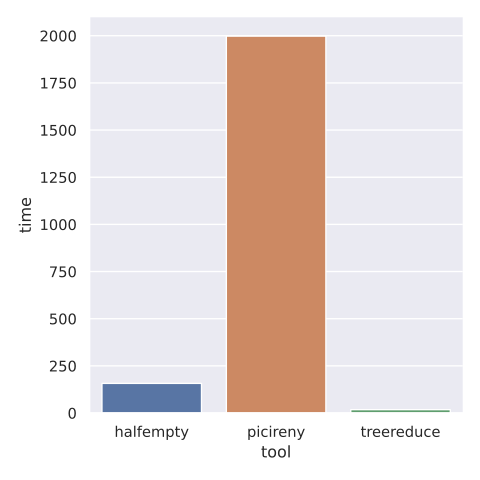
This benchmark involves running each tool with its default settings on a
small C program. The “interestingness test” always fails. The chart shows that
halfempty and treereduce finish almost instantly, but Picireny takes 2s.
Data collection
The data were collected using this script:
#!/usr/bin/env bash

set -e

rm -f data.csv

export PYTHONOPTIMIZE=1
for tool in halfempty picireny treereduce; do
  timeout 300s \
    cargo run --quiet --example bench -- \
      --config "${2:-default}" \
      --jobs "$(nproc)" \
      --oracle clang \
      --tool "${tool}" \
      "${1}" >> data.csv
done
Design
Goals
The core reduction algorithm has three goals:
- Go fast
- Produce small test cases
- Produce readable test cases
Unlike more theoretical work in this space, the algorithm does not attempt to minimize the number of “oracle queries”, that is, invocations of the user-provided “interestingness test”.
Design Statement
The aims of treereduce are more pragmatic than academic. It is based on
similar principles to those discussed in the AFL whitepaper:
[treereduce] does its best not to focus on any singular principle of operation and not be a proof-of-concept for any specific theory. […] The only true governing principles are speed, reliability, and ease of use.
Assumptions
These assumptions strongly inform the algorithm design:
- The interestingness will be comparatively slow—it will generally involve spinning up a new process, disk I/O, parsing, type-checking, etc.
- Smaller inputs lead to faster interestingness tests.
These assumptions hold for the use-case of reducing programs that cause compiler crashes.
High-Level Design
Due to Assumption (1), it’s essential that treereduce
execute several interestingness tests in parallel. Luckily, for the same reason,
lock contention is unlikely to be a major issue—so long as executing the
interestingness test doesn’t require holding a lock, most threads will spend the
majority of their time executing the interestingness test, rather than waiting
for locks on shared data. (This claim has been validated by profiling
several benchmarks.)
The recent paper “PARDIS : Priority Aware Test Case Reduction” highlights the importance of prioritization of reductions. Greedy removal of the largest subtrees leads to greatly increased performance due to faster interestingness tests (Assumption (2)).
With these ideas in mind, the overall algorithm design involves spinning up some number of threads, which share three pieces of data:
- The original text and syntax tree of the target (read-only)
- A prioritized max-heap of reduction tasks (read-write)
- A set of edits to the syntax tree (read-write)
where an edit is either the deletion of a subtree, or a replacement of one subtree by another. Each thread executes the following loop:
- Pop a reduction task off the heap.
- Create a local copy of the edits. Add edits according to the current task.
- Execute the interestingness test on the reduced program, i.e., the target as altered by the local set of edits.
- If the reduced program was still interesting, try replacing the global edits. If the global edits were changed by another thread, try this task again with the new edits, that is, go to (2).
- Push any new tasks onto the task queue.
- Go to (1).
If lock contention does become an issue, it may be beneficial for each thread to maintain a local task heap in addition to the global one, or even to attempt multiple tasks before replacing the global edits.
Reduction Strategies
treereduce uses several strategies during program minimization:
- Deletion: When a child is optional,
treereduceattempts to delete it. For example,treereducemight delete theconstinconst int x;. - Delta debugging (TODO(#2)): When a node has a list of children,
treereduceuses delta debugging to delete as many as possible in an efficient way. - Hoisting (TODO(#3)): Nodes with a recursive structure may be replaced
by their descendants, e.g. replacing
5 + (3 * y)with justy.
Bibliography
TODO(#16): BibTeX
- Gharachorlu, G. and Sumner, N., 2019, April. : Priority Aware Test Case Reduction. In International Conference on Fundamental Approaches to Software Engineering (pp. 409-426). Springer, Cham.
- Sun, C., Li, Y., Zhang, Q., Gu, T. and Su, Z., 2018, May. Perses: Syntax-guided program reduction. In Proceedings of the 40th International Conference on Software Engineering (pp. 361-371).
- Hodován, R. and Kiss, Á., 2016, July. Practical Improvements to the Minimizing Delta Debugging Algorithm. In ICSOFT-EA (pp. 241-248).
- Hodován, R. and Kiss, Á., 2016, November. Modernizing hierarchical delta debugging. In Proceedings of the 7th International Workshop on Automating Test Case Design, Selection, and Evaluation (pp. 31-37).
- Vince, D., Hodován, R., Bársony, D. and Kiss, Á., 2021, May. Extending Hierarchical Delta Debugging with Hoisting. In 2021 IEEE/ACM International Conference on Automation of Software Test (AST) (pp. 60-69). IEEE.
- Kiss, Á., Hodován, R. and Gyimóthy, T., 2018, November. HDDr: a recursive variant of the hierarchical delta debugging algorithm. In Proceedings of the 9th ACM SIGSOFT International Workshop on Automating TEST Case Design, Selection, and Evaluation (pp. 16-22).
- Hodován, R., Kiss, Á. and Gyimóthy, T., 2017, September. Coarse hierarchical delta debugging. In 2017 IEEE international conference on software maintenance and evolution (ICSME) (pp. 194-203). IEEE.
- https://blog.sigplan.org/2021/03/30/an-overview-of-test-case-reduction/
- https://blog.trailofbits.com/2019/11/11/test-case-reduction/
- https://www.drmaciver.com/2017/06/adaptive-delta-debugging/
- https://www.drmaciver.com/2019/01/notes-on-test-case-reduction/
Changelog
[0.4.1] - 2025-12-13
- Fix bug that caused hangs (#339)
- Bump dependency versions
0.4.0 - 2025-10-25
- Bump dependency versions
0.3.1 - 2024-12-23
Fixed
- A bug that caused hangs with multiple threads
- A bug that caused only one pass to perform reductions
0.3.0 - 2023-07-17
Added
- Lua support
Changed
- Bump dependencies
0.2.2 - 2023-04-06
Changed
- Bump dependencies
0.2.1 - 2023-03-21
Fixed
- Actually kill timed-out subprocesses
0.2.0 - 2023-03-16
Added
- Flags for stdout/stderr regexes
- Support for JavaScript
--timeout- Test with
lit
Changed
- Improved error message for initially-uninteresting inputs
- Improvements to library API, move multi-pass reduction into the library
- Updated benchmarks
Fixed
- Map Unix signals to exit codes like Bash does
0.1.0 - 2023-03-11
Initial release!
Build
To build from source, you’ll need the Rust compiler and the Cargo build tool. rustup makes it very easy to obtain these. Then, get the source:
git clone https://github.com/langston-barrett/treereduce
cd treereduce
Finally, build everything:
cargo build --release
You can find binaries in target/release. Run tests with cargo test.
Development
To get set up to build from source, see build.
Tools
In addition to Cargo and rustc, you’ll need clippy to lint your code.
Testing
Tested with lit and FileCheck .
cargo build
lit --path=$PWD/test/bin --path=$PWD/target/debug test/
Tuning
Benchmarking
Profiling
Profiling multi-threaded programs is hard. Use the included Poor Man’s Profiler like so:
Start the task you want to profile:
cargo run --bin treereduce-c -- -j 12 --output - -s ./crates/treereduce/benches/c/hello-world-big.c 'clang -o /dev/null @@.c'
In a separate terminal:
./scripts/profile.sh |& tee prof.log
Releasing
- Create branch with a name starting with
release - Update
doc/changelog.md - Update the version number in
Cargo.toml, thencargo build --release - Check that CI was successful on the release branch
- Merge the release branch to
main - Delete the release branch
git checkout main && git pull origin && git tag -a vX.Y.Z -m vX.Y.Z && git push --tags- Verify that the release artifacts work as intended
- Release the pre-release created by CI
- Check that the crates were properly uploaded to crates.io
Linting and formatting
We employ a variety of linting and formatting tools. They can be run manually or with Ninja.
Ninja script
To run all the linters:
./scripts/lint/lint.py
To run all the formatters:
./scripts/lint/lint.py --format
As a pre-commit hook:
cat <<'EOF' > .git/hooks/pre-commit
#!/usr/bin/env bash
./scripts/lint/lint.py
EOF
chmod +x .git/hooks/pre-commit
Clippy
We lint Rust code with Clippy.
You can install Clippy with rustup like so:
rustup component add clippy
and run it like this:
cargo clippy --all-targets -- --deny warnings
Generic scripts
We have a few Python scripts in scripts/lint/ that perform one-off checks.
They generally take some number of paths as arguments. Use their --help
options to learn more.
mdlynx
We run mdlynx on our Markdown files to check for broken links.
git ls-files -z --exclude-standard '*.md' | xargs -0 mdlynx
Mypy
We lint Python code with mypy in --strict mode.
git ls-files -z --exclude-standard '*.py' | xargs -0 mypy --strict
Ruff
We lint and format Python code with Ruff.
git ls-files -z --exclude-standard '*.py' | xargs -0 ruff format
git ls-files -z --exclude-standard '*.py' | xargs -0 ruff check
rustfmt
We format Rust code with [rustfmt].
You can install rustfmt with rustup like so:
rustup component add rustfmt
and then run it like this:
cargo fmt --all
ShellCheck
We lint shell scripts with ShellCheck.
git ls-files -z --exclude-standard '*.sh' | xargs -0 shellcheck
taplo
We format TOML files with taplo.
git ls-files -z --exclude-standard '*.toml' | xargs -0 taplo format
ttlint
We lint text files with ttlint.
git ls-files -z --exclude-standard '**' | xargs -0 ttlint
typos
We run typos on Markdown files.
git ls-files -z --exclude-standard '*.md' | xargs -0 typos
zizmor
We lint our GitHub Actions files with zizmor.
zizmor .github